
Build with us
A model adapter, a console experiment, or a complete browser game. Choose a path and make the next experiment reproducible.
MODEL ARCADE LAB / OPEN RESEARCH ↗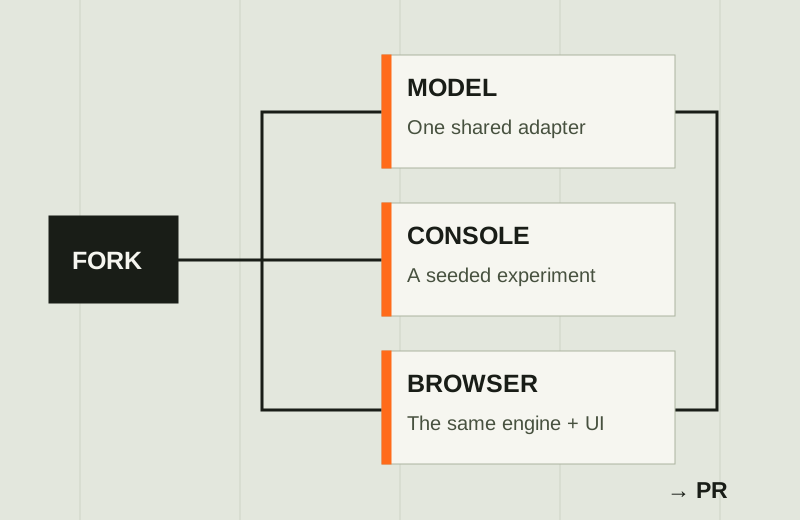
You do not need to build a UI to contribute a game. Start with a deterministic engine, useful baselines, and a benchmark export. Add a browser view when the experiment benefits from one.
Fork the repository ↗Adapt the model to the shared decision interface.
Implement a backend in models.py. A backend receives state text, instructions, and a dictionary of candidate IDs to descriptions. Return a selected candidate ID and probabilities keyed by those same IDs.
class ExampleBackend(Backend):
    name, label = "example", "Example Model"

    @classmethod
    def availability(cls):
        # Check installation / configuration without loading weights.
        return True, ""

    def answer(self, state, instructions, criteria):
        # Call your model, map its output to candidate IDs, validate it.
        choice, probabilities = your_adapter(state, instructions, criteria)
        return choice, probabilities
This is an adapter outline: replace your_adapter with the actual model call. Never execute the submitted setup instructions on the public site.
- Register the backend.Add it to
BACKENDSinmodels.py. Reuse cached instances, declare concurrency, keep loading lazy, and describe required packages or API settings. - Wire every supported game.Dino, Flappy, Chess, and Sudoku generate model players from
BACKENDS. 2048 registers its model player classes explicitly inengine2048.py; add the corresponding wrapper there. UpdateMODELSinbenchmark.pyandwebsite/catalog.py. - Verify the output contract.Use candidate IDs exactly. Handle one-option decisions, missing probabilities, unavailable dependencies, and malformed responses. Document guards and avoid hidden fallback policies that inflate performance.
- Run comparisons.Compare against existing baselines with identical seeds. Include the command, model revision, hardware, dependencies, and result file in your PR.
Add a console game
Engine first.
Browser optional.
Make the experiment reproducible before presenting it.
- Create
engineyourgame.py.Keep rules, legal actions, scoring, and terminal conditions in Python. Accept an environment seed and use a separate reproducible RNG stream for randomized policies. Add aVERSIONwhen mechanics may change. - Describe the decision.Convert state into concise text and stable action IDs with descriptions. Provide
PLAYERS, player availability checks, and a cachedget_player(name). Supply a random policy and a meaningful heuristic baseline. - Connect the headless runner.Register the engine in
benchmark.py'sMODS, add the game adapter toplay_single(), and update CLI help. Multiplayer games need a driver likerun_chess()rather than the single-player loop. - Return useful metrics.Record score plus game-specific measurements, timing, model-call counts, control mode, and version where applicable. Use the existing run/checkpoint/result/status protocol and JSON export.
- Test and document.Test determinism, legal moves, score rules, and stopping conditions. Add the game to the README and site catalog, explain its baselines, and include an exported run. The website has a generic table for new games; customize columns in
website/static/benchmarks.jsif useful.
After registering your game, run this from the repository root. Replace yourgame with the registered ID:
./benchmark --game yourgame --players random greedy \
  --games 10 --seed 42 \
--json website/benchmark-data/yourgame.jsonThe website can show its exported results without serving the engine, installing its dependencies, or loading a model.
Add the browser UI
The same engine.
A visible decision.
Build on the console game, then make it observable.
- Reuse authoritative rules.Prefer server-side state, as Chess, Sudoku, Dino, and Flappy do. Expose create/step endpoints in
server.pywith validated models, per-session locking, terminal states, and trace logging. - Add the two game pages.Create
play_yourgame.htmlandarena_yourgame.html. Include a model selector, step, autoplay/pause, reset, score, decision context, and probabilities. Arena comparisons should use the same seeds. - Connect routes and navigation.Add explicit page/asset routes in
server.pyand game links on the arcade pages. Use the sharedarcade.cssdesign.arcade.jshandles only Dino and Flappy; a new game needs its own controller/renderer. - Verify the experience.Test pause/reset while requests are in flight, errors, unavailable models, finished-game persistence, and narrow layouts. Capture real screenshots, add descriptive captions, and update the README.
Use the headless engine as the source of truth. Playback speed should change presentation, not scores or collision outcomes.
Fork → branch → implement → verify → pull request.
Fork the repository on GitHub, clone your fork, and create a branch. Follow the root README for game/model dependencies; the website has its own lightweight requirements.
git clone https://github.com/YOUR-USERNAME/system-one-models-game-test.git
cd system-one-models-game-test
git switch -c feat/your-contribution

# Implement, then run the relevant checks.
.venv/bin/python -m unittest discover -s tests -v
./benchmark --quick --no-save --json website/benchmark-data/check.json

# For website changes:
cd website
docker compose up --build -d
docker compose run --rm --no-deps \
  -v "$PWD/tests:/app/tests:ro" web \
  python -m unittest discover -s tests -v
cd ..

git add
git commit -m "Add your contribution"
git push -u origin feat/your-contribution
Include in your pull request
- The problem, final behavior, and integration path.
- Source links, creator credit, model/asset license, and access requirements.
- Reproduction commands, seeds, control mode, engine version, and hardware.
- Meaningful test results and a benchmark JSON export.
- Screenshots for UI changes, plus any limitations or assistance.
Open a pull request from your branch to this repository using GitHub's Compare view. Fill out the PR template, link a suggestion or issue if you have one, and respond to review. Keep credentials and model weights out of the commit.